

Close Menu
    Facebook X (Twitter) Instagram
    Wifi PortalWifi Portal
    • Blogging
    • SEO & Digital Marketing
    • WiFi / Internet & Networking
    • Cybersecurity
    • Tech Tools & Mobile / Apps
    • Privacy & Online Earning
    Facebook X (Twitter) Instagram
    Wifi PortalWifi Portal
    Home»Cybersecurity»New TCLBanker malware self-spreads over WhatsApp and Outlook
    Cybersecurity

    New TCLBanker malware self-spreads over WhatsApp and Outlook

    adminBy adminMay 10, 2026No Comments3 Mins Read
    Facebook Twitter LinkedIn Telegram Pinterest Tumblr Reddit WhatsApp Email
    New TCLBanker malware self-spreads over WhatsApp and Outlook
    Share
    Facebook Twitter LinkedIn Pinterest Email

    New TCLBanker malware self-spreads over WhatsApp and Outlook

    A new trojan named TCLBanker, which targets 59 banking, fintech, and cryptocurrency platforms, uses a trojanized MSI installer for Logitech AI Prompt Builder to infect systems.

    Additionally, the malware includes self-spreading worm modules for WhatsApp and Outlook that automatically infect new victims.

    The new banking trojan was discovered by Elastic Security Labs, whose researchers believe it’s a major evolution of the older Maverick/Sorvepotel malware family.

    While TCLBanker currently appears focused in Brazil, specifically checking timezone, keyboard layout, and locale, LATAM malware has, in the past, been updated to broaden its targeting scope, so the risk of the threat expanding is real.

    TCLBanker capabilities

    Elastic warns that TCLBanker is extremely well protected against analysis and debugging, featuring environment-dependent payload decryption routines that fail in sandboxes or analyst environments.

    It also runs a persistent watchdog thread that continuously hunts for analysis tools like x64dbg, IDA, dnSpy, Frida, ProcessHacker, Ghidra, de4dot, and others.
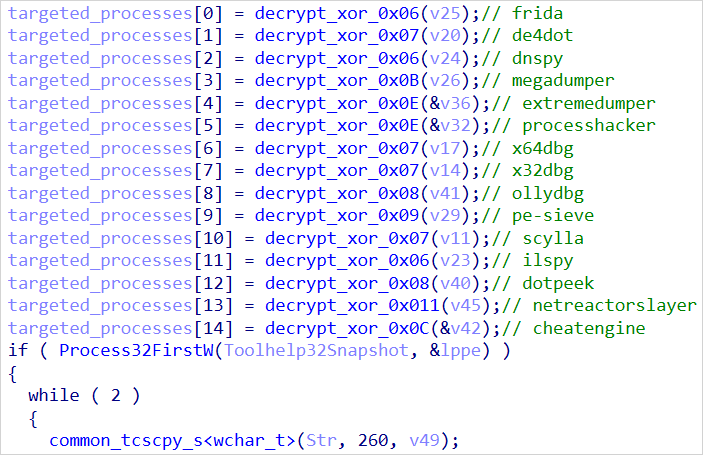
    Monitoring for targeted processes
    Monitoring for targeted processes
    Source: Elastic

    The malware is loaded within the context of the legitimate Logitech application via DLL side-loading, so it won’t trigger any alarms from security products protecting the infected host.

    The researchers noted that, while the loader is rich in features, none go very far toward being truly advanced, and code artifacts indicate that AI may have been used in its development.

    The banking module monitors the browser address bar every second using Windows UI Automation APIs, watching for when the victim opens a website of one of its 59 targeted platforms.

    When that happens, it establishes a WebSocket session with the command-and-control (C2), sends victim and system information, and starts remote control operations.

    The capabilities given to the operators include:

    • Live screen streaming
    • Screenshot capturing
    • Keylogging
    • Clipboard hijacking
    • Shell command execution
    • Window management
    • File system access
    • Process enumeration
    • Remote mouse/keyboard control

    During active sessions, the Task Manager process is killed to prevent disruptions and hide the malicious activity from the victim.

    To support data theft, TCLBanker uses a WPF-based overlay system that can push to victims fake credential prompts, PIN keypads, phone-number collection forms, fake “bank support” waiting screens, fake Windows Update screens, and various fake progress screens.

    There are also “cutout” overlays that stay on top, allowing only selected portions of real applications to be shown to the victim, and masking other parts.
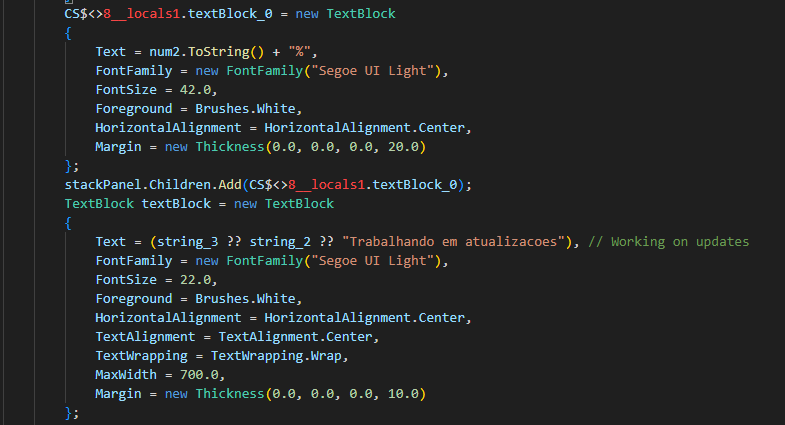
    Fake Windows update overlay
    Generating a fake Windows update overlay
    Source: Elastic

    WhatsApp and Outlook worms

    An interesting aspect of TCLBanker is its ability to propagate autonomously to contacts linked to the primary victim.

    The malware searches Chromium browser profiles for authenticated WhatsApp Web IndexedDB data, and launches a hidden Chromium instance that hijacks the victim’s account.
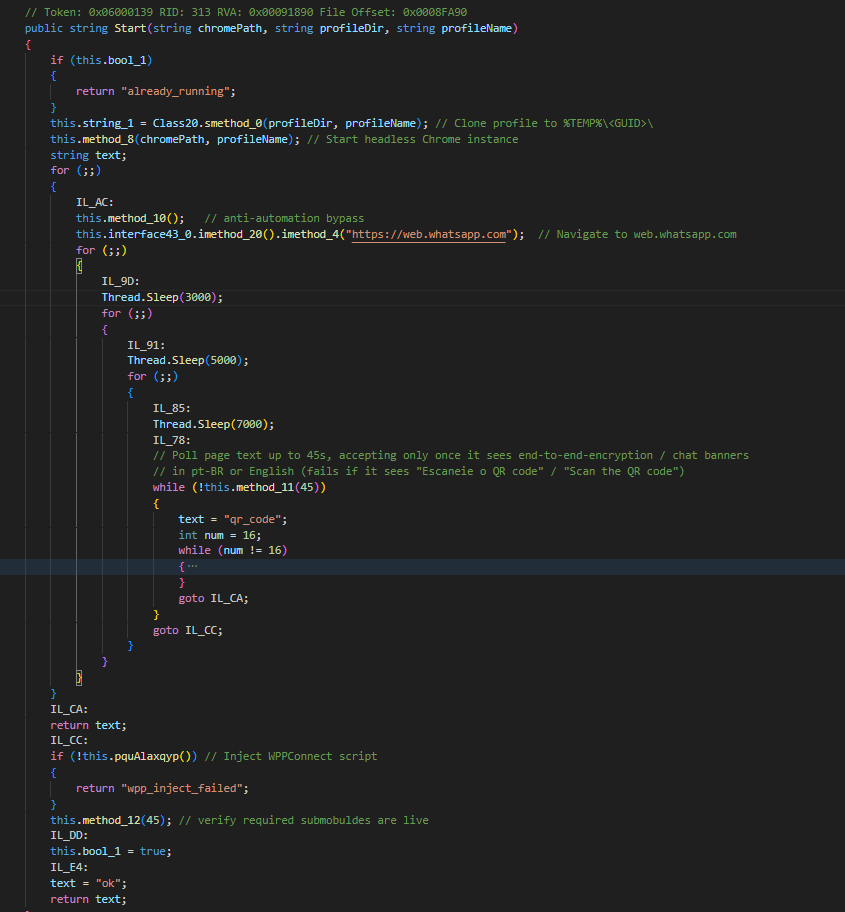
    Hijacking WhatsApp accounts
    Hijacking WhatsApp accounts
    Source: Elastic

    Then, it harvests contacts, filters for Brazilian numbers, and sends them spam messages from the victim’s account, leading them to TCLBanker distribution platforms.

    Another worm module abuses Microsoft Outlook through COM automation, launching the app, harvesting contacts and sender addresses, and sending phishing emails through the victim’s email account.
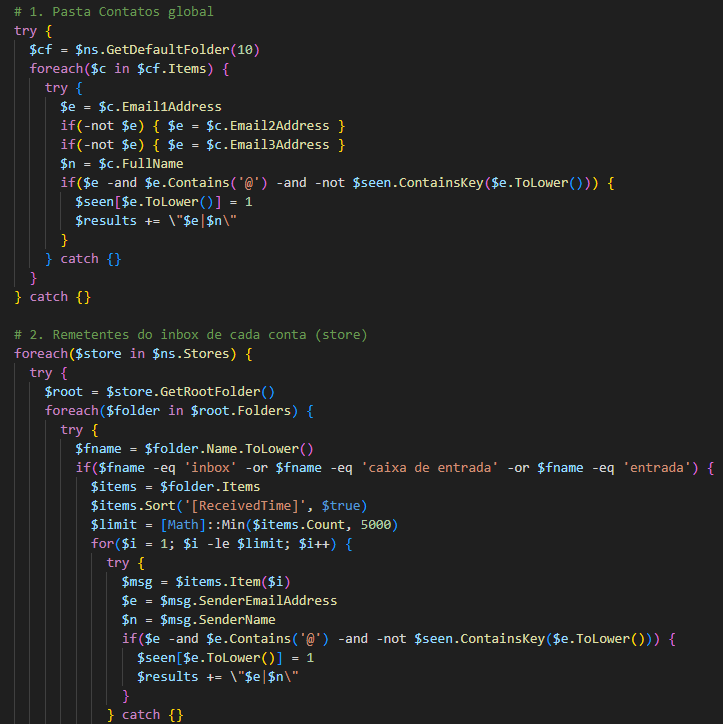
    Harvesting Outlook contacts
    Harvesting Outlook contacts
    Source: Elastic

    Elastic concludes that TCLBanker is as a characteristic example of the evolution of LATAM malware, offering lower-tier cybercriminals features that were once only available in highly sophisticated tools.


    article image

    AI chained four zero-days into one exploit that bypassed both renderer and OS sandboxes. A wave of new exploits is coming.

    At the Autonomous Validation Summit (May 12 & 14), see how autonomous, context-rich validation finds what’s exploitable, proves controls hold, and closes the remediation loop.

    Claim Your Spot

    Malware Outlook selfspreads TCLBANKER WhatsApp
    Share. Facebook Twitter Pinterest LinkedIn Tumblr Telegram Email
    Previous ArticleGoogle’s Quality Threshold Is Quietly Killing Scaled AI Content At Ranking
    Next Article Week in review: cPanel vulnerability actively exploited, DigiCert breach, LinkedIn job scams
    admin
    • Website

    Related Posts

    Encryption Consulting launches CertSecure Manager v3.3 with zero-touch certificate renewals

    May 20, 2026

    GitHub confirms breach of 3,800 repos via malicious VSCode extension

    May 20, 2026

    Grafana GitHub Breach Exposes Source Code via TanStack npm Attack

    May 20, 2026
    Add A Comment
    Leave A Reply Cancel Reply

    Search Blog
    About
    About

    At WifiPortal.tech, we share simple, easy-to-follow guides on cybersecurity, online privacy, and digital opportunities. Our goal is to help everyday users browse safely, protect personal data, and explore smart ways to earn online. Whether you’re new to the digital world or looking to strengthen your online knowledge, our content is here to keep you informed and secure.

    Trending Blogs

    Mueller Explains Why Google Uses Markdown On Dev Docs

    May 21, 2026

    Google Marketing Live 2026: Everything you need to know

    May 21, 2026

    Google unveils Gemini 3.5 Flash and a redesigned ‘intelligent Search box’

    May 21, 2026

    12 Awesome Custom Google Analytics Reports Created by the Experts

    May 20, 2026
    Categories
    • Blogging (82)
    • Cybersecurity (1,955)
    • Privacy & Online Earning (223)
    • SEO & Digital Marketing (1,214)
    • Tech Tools & Mobile / Apps (1,796)
    • WiFi / Internet & Networking (306)

    Subscribe to Updates

    Stay updated with the latest tips on cybersecurity, online privacy, and digital opportunities straight to your inbox.

    WifiPortal.tech is a blogging platform focused on cybersecurity, online privacy, and digital opportunities. We share easy-to-follow guides, tips, and resources to help you stay safe online and explore new ways of working in the digital world.

    Our Picks

    Mueller Explains Why Google Uses Markdown On Dev Docs

    May 21, 2026

    Google Marketing Live 2026: Everything you need to know

    May 21, 2026

    Google unveils Gemini 3.5 Flash and a redesigned ‘intelligent Search box’

    May 21, 2026
    Most Popular
    • Mueller Explains Why Google Uses Markdown On Dev Docs
    • Google Marketing Live 2026: Everything you need to know
    • Google unveils Gemini 3.5 Flash and a redesigned ‘intelligent Search box’
    • 12 Awesome Custom Google Analytics Reports Created by the Experts
    • Selector targets the network visibility gap in multi-cloud infrastructure
    • How to Persuade Your Boss to Send You to Ahrefs Evolve in San Diego
    • Key AEO & Content Trends for 2026
    • Google adds llms.txt check to Chrome Lighthouse
    © 2026 WifiPortal.tech. Designed by WifiPortal.tech.
    • Home
    • About Us
    • Contact Us
    • Privacy Policy
    • Terms and Conditions
    • Disclaimer

    Type above and press Enter to search. Press Esc to cancel.