

Microsoft has confirmed that Windows 11 is getting a new modern Run dialog with dark mode support and faster performance in a new preview build 26300.8346.
The Run dialog has been around since the Windows 95 era, and it is one of those small Windows features that many power users still rely on every day.
You just need to press Win + R, type a command, open a file path, launch a tool, or quickly jump to a location without opening File Explorer first.
With the new version, Microsoft is trying to modernize Run without changing what makes it useful.
Unlike the legacy Run, modern Run matches Fluent Design, supports dark mode out of the box, and is actually faster than the legacy Run.
That is interesting because modern counterparts usually have a reputation for slower performance.
.png)
Microsoft noted that designing a modern Run dialog for Windows 11 was challenging, as the company had to maintain the same performance and retain the minimal user interface, similar to the original Run that shipped with Windows 95.
“When we set out on creating the new experience, we knew the existing dialog was fast. We also knew we needed to be sure we deeply understood how you all used it. Modernize, be opinionated, and evolve it,” Microsoft explained in a blog post.
“To help evolve, we added a measure briefly to the dialog to see what was being used and to measure time-to-show. This confirmed a few key things that helped the design process.”
Microsoft says performance was one of the most important factors when designing the modern Run dialog. That’s because quite a lot of people use the existing Run dialog to paste text from the clipboard, then copy it again to remove text formatting.
This experience mostly works because of how fast the existing Run is. The legacy Run dialog takes approximately 103ms to appear after you press the Win + R keyboard shortcut.
Interestingly, the modern Run is actually faster. It has a median time-to-show of just 94ms.
“This was a huge team effort – we’ve collaborated tightly with partners across the platform to get these UI surfaces loading snappy. Improvements we’ve made to the platform don’t just make Run fast, but they help make the whole OS more efficient,” the company said.
Microsoft says it expects these numbers to improve as well as there is still room for improvement,
Microsoft drops ‘Browse’ feature in new Run
Microsoft looked at how people use the existing Run dialog before deciding what should stay and what could be removed. One example is the Browse button, which lets you browse a specific directory to open a program.
According to Microsoft, the Browse button usage is less than 0.0038%. This number is based on a sample of 35 million users who open Windows Run.
As a result, Microsoft has dropped the Browse button from the modern Run. The company argues that it researched how Run was being used and how fast it was, which helped form a baseline to build the modern Run.
Modern Run also supports ~\, which allows you to quickly access your home directory. It also shows icons in the list, which should make entries easier to identify without making the dialog feel too heavy.
How to enable or disable modern Run
While modern Run looks great and works well in our test, some of you may not like the idea, which is why the feature is entirely optional and tied to Advanced Settings in Windows.
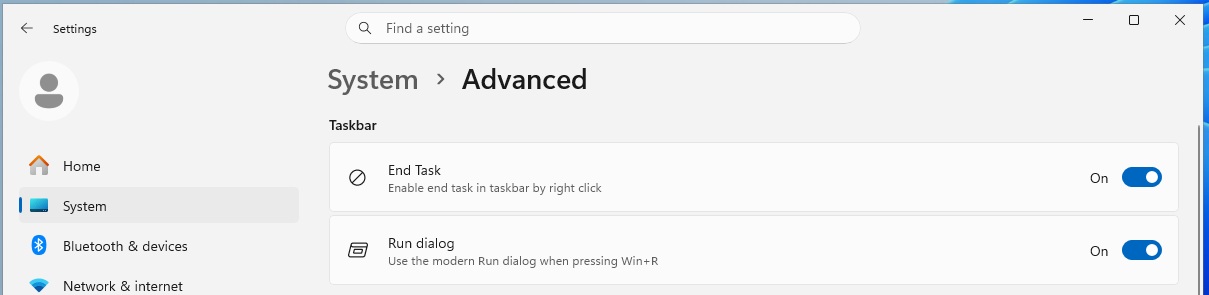
According to Microsoft, modern Run does not get turned on automatically. Instead, you need to open Settings > Advanced Settings and manually enable modern Run, which replaces the legacy Run.
Source: BleepingComputer
There are also plans to add more features to modern Run, and Microsoft says it is collecting feedback before rolling it out more broadly.
Other changes rolling out with today’s preview update
In addition to the Run dialog upgrade, Microsoft is improving Windows Share UI for AAD users.
Until now, if you wanted to add an app to the share dialog, you had to open the MS Store, install the app first, and then find it in the Share list. Now, you can install apps directly from the Share UI.
Last but not least, Magnifier now gives you more control over how you zoom, including preset zoom levels of 5%, 10%, 25%, 50%, 100%, 150%, 200%, and 400%.
These changes will roll out to everyone in the coming months, but for now, you’ll need to download Windows 11 Build 26300.8346 from the new Experimental Channel.

AI chained four zero-days into one exploit that bypassed both renderer and OS sandboxes. A wave of new exploits is coming.
At the Autonomous Validation Summit (May 12 & 14), see how autonomous, context-rich validation finds what’s exploitable, proves controls hold, and closes the remediation loop.
